A LAN cable is used to physically connect devices in a network. LAN cables have been used for decades. They provide a wired, stable connection and fast data transfer. To streamline the cabling process, increase the reliability of the connection and improve the contact properties, the wire and the end should be properly connected. Crimping the end on the wire is called crimping. In this article, you will learn what a LAN cable is, where it is used and how to crimp it correctly.
Check cables and wires at the Onninen wholesaler
What is a LAN cable and what is it used for?
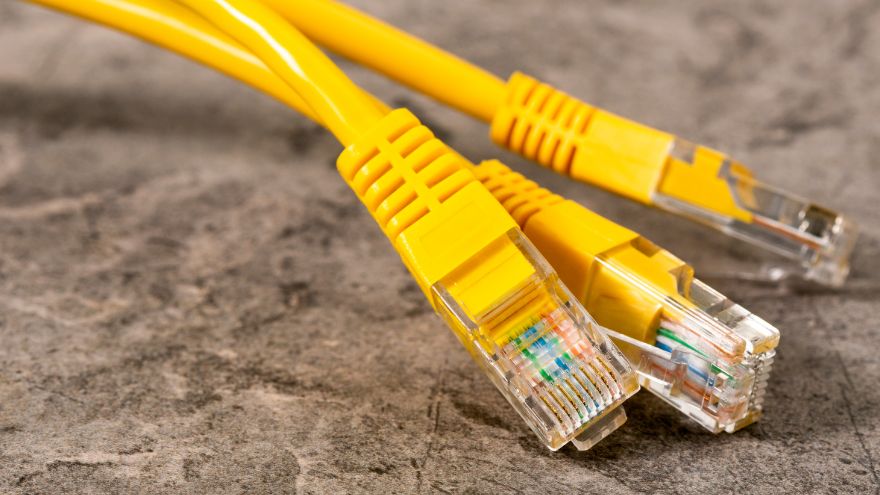
LAN cable is a type of network cable. LAN is an abbreviation for " Local Area Network ", which means local area network. LAN cables connect devices in a local area network (LAN) to a network connector. They enable data transfer between several devices in the network: computers, routers, servers, industrial cameras, printers, etc. A LAN cable resembles a telephone cable. It comes in various colors, including blue, yellow, orange and gray. It is made of 8 wires twisted into 4 pairs of wires. Each performs specific functions determined by the adopted connection standard. A characteristic feature of a LAN cable is the identical plugs on both ends - these are RJ-45 connectors. The RJ45 connector is a standard for various devices. A cable with an RJ-45 connector allows you to connect, for example, a computer or laptop directly to the network, e.g. to a router. It provides more reliable and more efficient signal reception compared to a wireless Wi-Fi connection. Transmission  data using this method is usually faster and more stable. LAN is also more effectively protected against hacker attacks. For this reason, many large computer networks are based on wired Internet connectivity. RJ45 plugs are rectangular in shape with a small nose, which allows for stable connection of the element to the Ethernet port (LAN port), as well as a diode providing light information about activity on the end device. Network devices are equipped with a LAN port as standard. The exception are small laptops, which often do not have a LAN socket due to their size. LAN cables available on the market vary in length, color and data transmission speed.
Making a LAN cable – a basic step when building a computer network
Correct termination of a LAN network cable is essential for stable and efficient operation of a computer network. In modern computer networks, twisted-pair cables, constructed from four pairs of wires, play an important role. Thanks to their special construction, they ensure the reduction of electromagnetic interference and crosstalk between pairs of wires, which translates into high quality wired signal transmission. A huge advantage of twisted-pair cables is their flexibility and versatility. They can be easily adapted to individual needs and installation requirements. They work well in most applications. They are also relatively easy to assemble and process. This last feature is extremely important in the context of building network installations, where LAN cables must be properly terminated.
Making a LAN cable – preparation
All cables and wires , including RJ45 (LAN) network cables, must be properly prepared for splicing. Start by checking the cable length for fit to the installation, taking into account the necessary pass-through and range of devices in the network. Then remove any contamination from the cable , such as dust, dirt, etc. A clean LAN cable is essential for its durability and performance, as well as for the reliability of the created network connection.
Making a LAN cable step by step
Arrange the wires by color – this is crucial for high signal quality. Efficient and stable signal transmission is ensured by the following wire arrangement (RJ45 type B diagram):
- white and orange
- orange
- white-green
- blue
- white and blue
- green
- white and brown
- brown
Make sure that the wires are properly plugged into the plugs . Make sure that proper contact is ensured with
pins. Remember to:
- shorten the cables to the required length
- do not disconnect wire pairs unless necessary
- place the wires precisely in the plug – each wire must be in its place
- If the cables are not positioned correctly, move them carefully and gently
- make sure that each wire is clearly visible at the end of the plug - this
 it means that you did the task correctly
Practical tools for making LAN cables
Various tools support you in precise and efficient crimping of LAN cables. The basic tool is a crimper , which allows for precise arrangement of wires in the RJ45 connector and their permanent crimping. Crimpers are often equipped with multi-functional jaws, allowing not only crimping, but also cutting and stripping of wires. More advanced models offer pressure adjustment, which minimizes the risk of damaging elements during crimping. If you often perform electrical work, a crimped wire tester will come in handy. With its help, you can quickly and accurately verify the correctness of connections.
At the Onninen electrical wholesaler you will find high-quality cables for specific telecommunications needs. We offer fiber optic cables, cables for computer networks, intercom cables, coaxial cables, internal and external telecommunications cables , and ground cables for LAN networks . If you have any problems with choosing, we are here to help.